
Redadeg
Active member
As explained in the other thread i "completed" Dashboards for SimHub. Mybe the devs can sticky this (if wanted), i will regularly update the dashboards when - hopefully - new data exports are included to the game.
Update 26.04.24:
-All Dashboards with smaller or bigger improvements/tweaks.
- Compelte overhaul of the Peugeot Dash.
- Now 2 sider.
- Included eBoost Torque indicator wich give us blind simracers a small idea which motor map is chosen.
- Now 2 pages avaiable. 2nd page mainly race page with more lap informations
- Live gaps between car in front/behind. Added flag indicator in Gear indicator, like in RL (saw onboard in Imola)
- added Stint indicator furmula based. Slainte to irishtim7
Let me know how you like it, cause its not 100 % accurate. And let me know if you like the "headlight indicator" in the new Peugeot Dashboard.
Since we have no data for the different light stages like in ACC, i hat to trick i bit, to make it work.
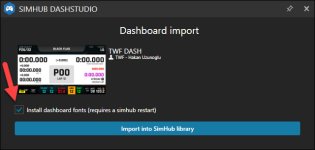
Keep in mind to install Peugeot Font for proper visualization.
Whats missing right now:
- TC Level indicator
- TC-Cut indigator
- TC-Slip indicator
- vEnergy
- vEnergy last lap
- Engine Mode
- Regen Mode
- Stint
- Front and Rear ARB
- Brake migration
Discussions pls here:
 community.lemansultimate.com
Fonts needed:
Font for Peugeot Dashboard
Font for Ferrari Dashboard
Font for Porsche dashboards
or
Update 26.04.24:
-All Dashboards with smaller or bigger improvements/tweaks.
- Compelte overhaul of the Peugeot Dash.
- Now 2 sider.
- Included eBoost Torque indicator wich give us blind simracers a small idea which motor map is chosen.
- Now 2 pages avaiable. 2nd page mainly race page with more lap informations
- Live gaps between car in front/behind. Added flag indicator in Gear indicator, like in RL (saw onboard in Imola)
- added Stint indicator furmula based. Slainte to irishtim7
Let me know how you like it, cause its not 100 % accurate. And let me know if you like the "headlight indicator" in the new Peugeot Dashboard.
Since we have no data for the different light stages like in ACC, i hat to trick i bit, to make it work.
Keep in mind to install Peugeot Font for proper visualization.
Whats missing right now:
- TC Level indicator
- TC-Cut indigator
- TC-Slip indicator
- vEnergy
- vEnergy last lap
- Engine Mode
- Regen Mode
- Stint
- Front and Rear ARB
- Brake migration
Discussions pls here:
Add missing parameters to telemetry for plugins
Hi, As rF2 (already asked many times on Discord for clarification and on the forum here without ever getting a response), it seems that LMU is missing some relevant data in the telemetry. I'm talking about at least: - TC level/mode - TC power cut level - TC slip angle - Fuel mixture/Motor map -...
community.lemansultimate.com
Fonts needed:
Font for Peugeot Dashboard
Font for Ferrari Dashboard
Font for Porsche dashboards
or
Attachments
Last edited: